Thursday, March 22, 2012

Adobe Photoshop CS6 hands-on preview

www.tech-sanity.com
Update! here is the link to the free beta from Adobe
First Look: Photoshop CS6 Beta is dark, swift, and content aware
Beta release reveals advances under the hood for boosting speed, intelligent operations, and 3D functionality
Adobe has announced, for the second time in its history, a free public beta of Photoshop. Photoshop CS6 will be available to try for the next few months as Adobe readies its Creative Suite of applications for launch alongside the brand new Creative Cloud online hub, targeted to creative pros. The Photoshop beta is available now on Adobe Labs. The new Photoshop version works only on 64-bit Mac systems, and no longer in 32-bit mode.
Various under-the-hood improvements promise to make life easier and protect long hours of labor intensive operations. The highest profile of these include Background Save and Auto Recovery, Preset Migration and Sharing, and the new Mercury Graphics Engine.
Simply selecting some program preferences lets Photoshop automatically save and recover your work in the event of a power interruption. When you upgraded from previous versions of Photoshop, you often lost painstakingly applied presets that automated many repetitive tasks. The new version lets you apply your presets, tools, and workspaces to the new upgrade. While the Mercury engine is familiar to users of Premiere Pro, Photoshop's new Mercury Graphics Engine is mostly a software-based implementation of multicore functionality.
The dark side
The changes in the new version of Photoshop are immediately apparent. The program has gone over to the dark side by default, opening to a sophisticated-looking dark gray interface. This is intended to complement themes of some of Adobe's other creative programs—specifically Lightroom 4, Premiere Pro, and After Effects.
Additional default themes in medium gray, light gray, and black are also included. However, you can set the interface colors to whatever you want, and they change immediately. The same holds true for Photoshop’s companion asset management application, the now 64-bit Bridge. The dark, Aperture-like theme looks attractive, but as with all light type on a dark background, menu items can be difficult to read.
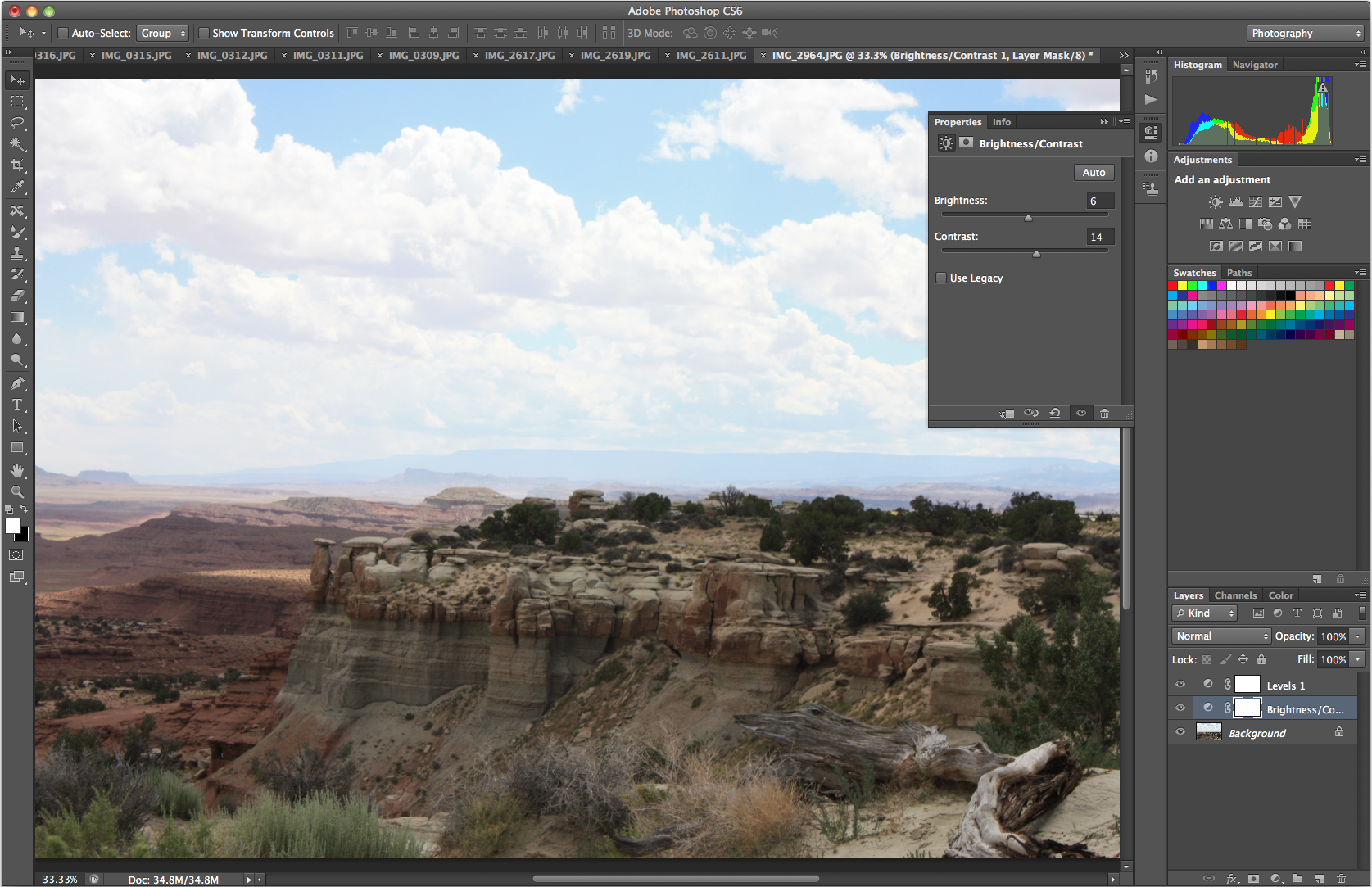
And speaking of interface updates, Adobe has also redesigned and streamlined the program’s menu icons, though they’re still familiar and easily recognizeable. Panels are now labeled in upper- and lowercase type instead of in all caps, enhancing legibility. A new Properties panel now combines Adjustment layer and Mask settings into a single panel. Attention to such details keeps the Photoshop looking fresh.
zoomIcon
photoshop20dark20interface-276091
Photoshop CS6 defaults to a dark interface with light type. But you can change it to whatever you want at any time.

Content awareness
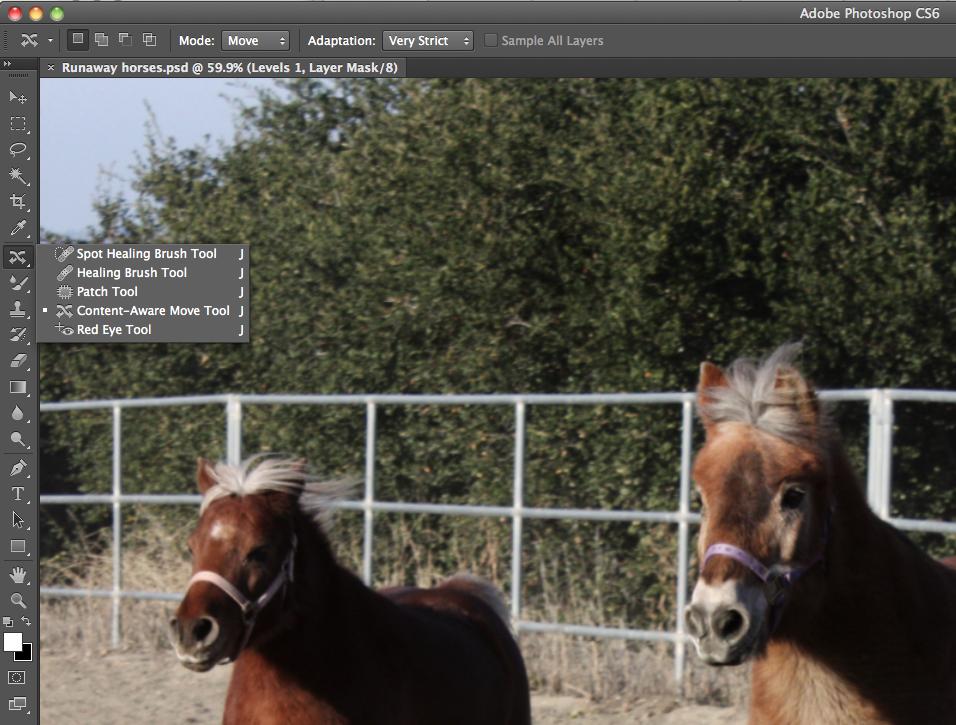
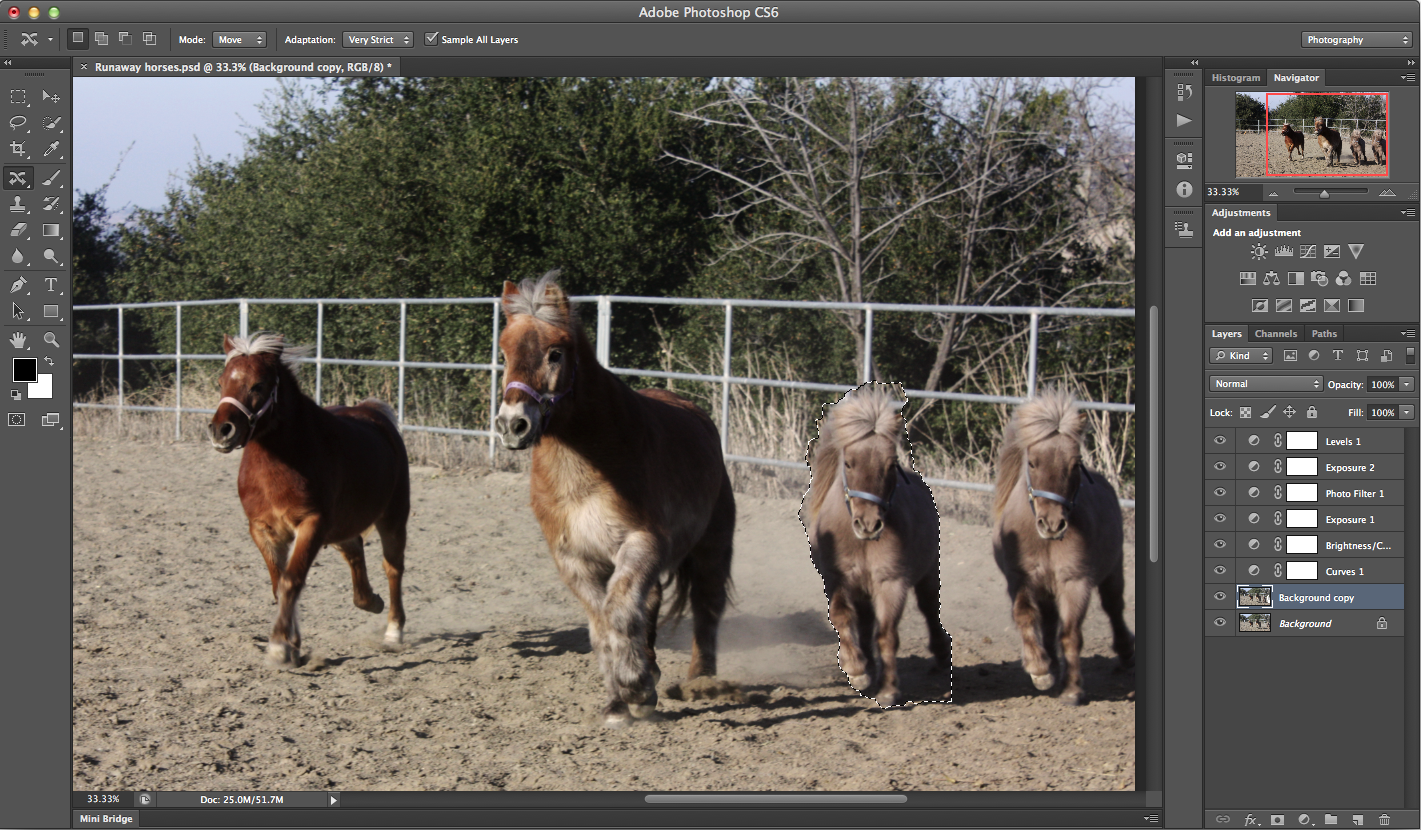
In past versions of Photoshop, Adobe introduced the concept of content-aware image technology, in which edits can take into account the relationship between objects and elements in an image. This lets you edit in an intuitive way with more realistic looking results. Adobe now has added to the content-aware features of previous versions the new Content Aware Move and Content Aware Patch functions. The Content Aware Move tool lets you pick up an object and relocate it to another part of the image while the program performs a content-aware fill operation in the background. The Patch tool's new Content Aware option, a more refined cloning operation, lets you choose the pixels used to fill a designated area in an image, as opposed to letting the program decide. Thus, Photoshop performs a little extra blending to make lines and patterns match.
zoomIcon
screen20shot202012-03-2120at206.08.4120pm-276448
The new content-aware tools are grouped with the Healing Brush in the toolbar.
zoomIcon
29-0520create20photoshopcs620content20aware20move-276068
The Content Aware Move tool lets you relocate objects within an image. The horse at the right was moved closer to his companions—note the selected new location.

Layer improvements
Over the years, Photoshop's layers feature has received much attention and many improvements. Photoshop CS6 adds a Layer Search function and the use of vector layers to apply—for the first time—strokes, dashed lines, and gradients to vector objects. Other tweaks include the ability to simultaneously change the blend mode of and to duplicate multiple layers. You can also now see opacity, fill, and blend modes of hidden layers. And you can now simultaneously change layer styles and effects for all layers in a group.
Adaptive Wide Angle filter
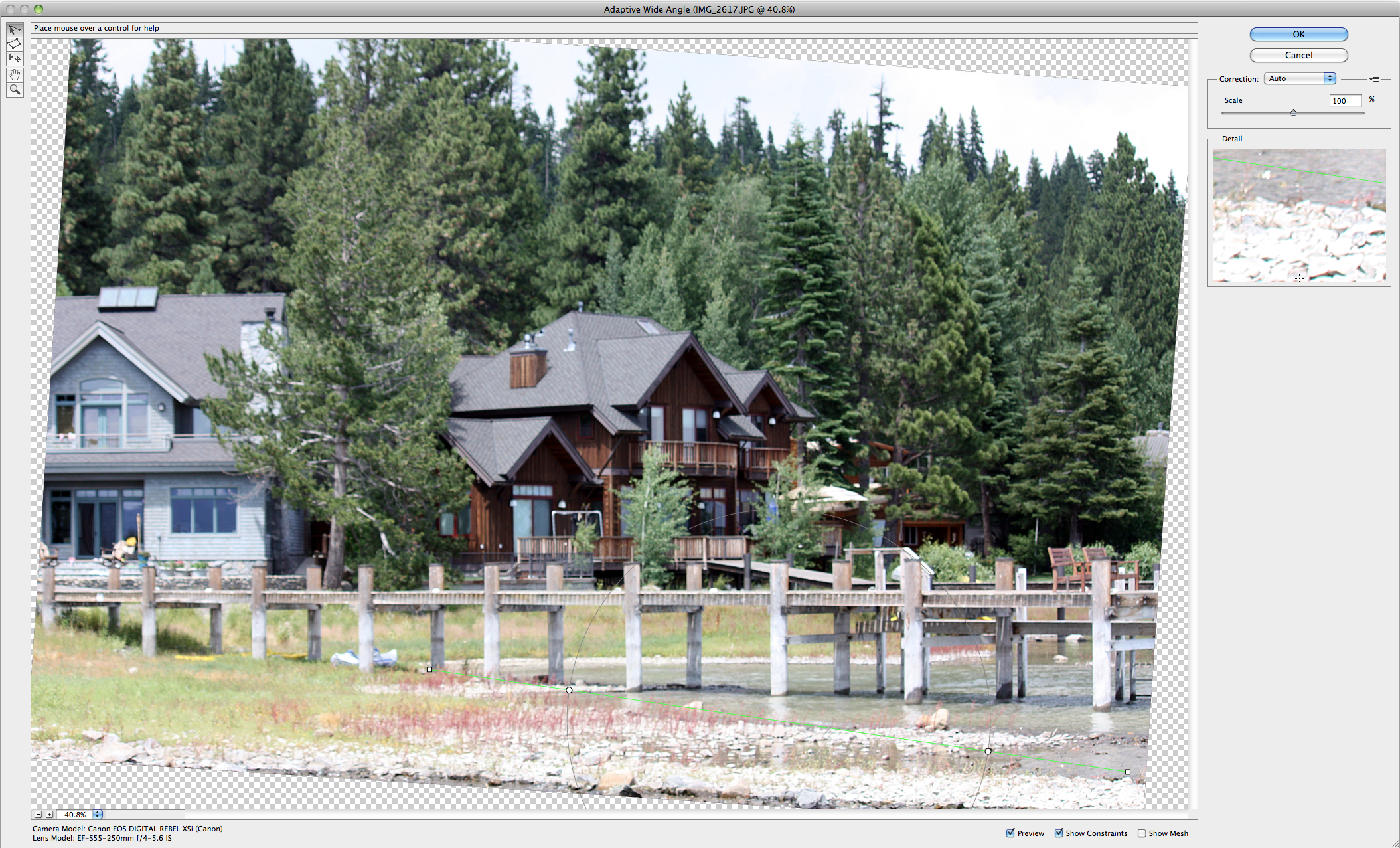
Photoshop CS6 offers a new way to achieve lens corrections. The Adaptive Wide Angle adjustment filter lets you quickly straighten objects that appear curved in photos shot with wide-angle or fish-eye lenses, or panoramas created with Photomerge. Using Adobe’s CS5 lens correction system, which fixes lens-based geometric distortion, chromatic aberration, and vignetting, the new filter reads lens metadata and lets you click and drag new on-canvas tools to straighten and align objects vertically or horizontally in the scene.
zoomIcon
screen20shot202012-03-2120at204.30.2520pm-276424
Using the new interactive Constraint tool, you can click to directly adjust an angled element in your image.
Crop tool
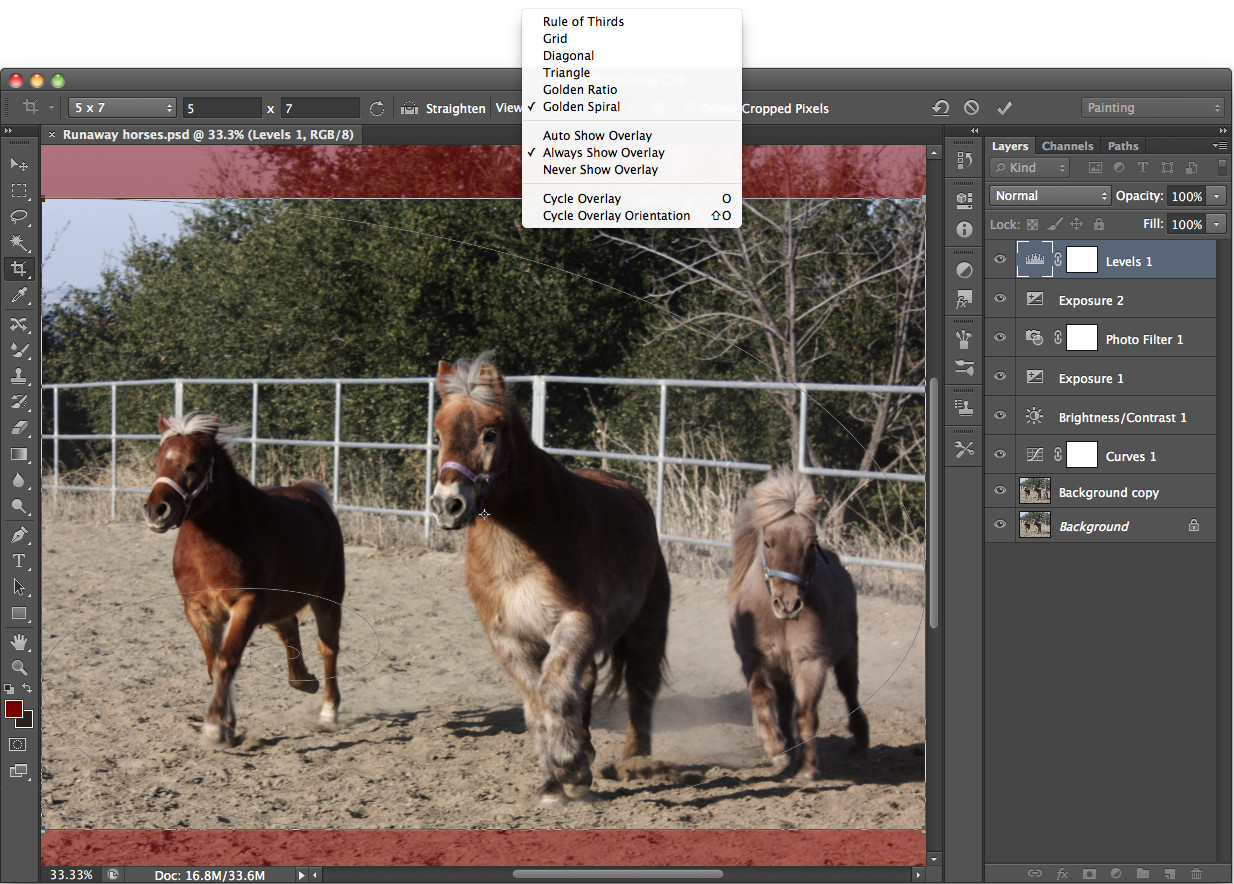
Photoshop CS6’s GPU-enabled, nondestructive Crop tool sports new composition controls. Whereas CS5 included a basic grid and Rule of Thirds overlay, CS6 lets you preview Golden Ratio, Diagonal, Triangle, and Golden Spiral overlays. You can also use the new Perspective Crop tool to straighten images. The new Crop tool is designed to help you change the aspect ratio (shape) of your image more easily, without accidentally changing resolution and thus the image quality.
zoomIcon
screen20shot202012-03-2120at206.18.3320pm-276454
A reconfigured Crop tool in Photoshop CS6 offers additional cropping overlays such as Golden Spiral (shown here) and Triangle. There’s a new Perspective Crop tool for straightening.
Blur Gallery
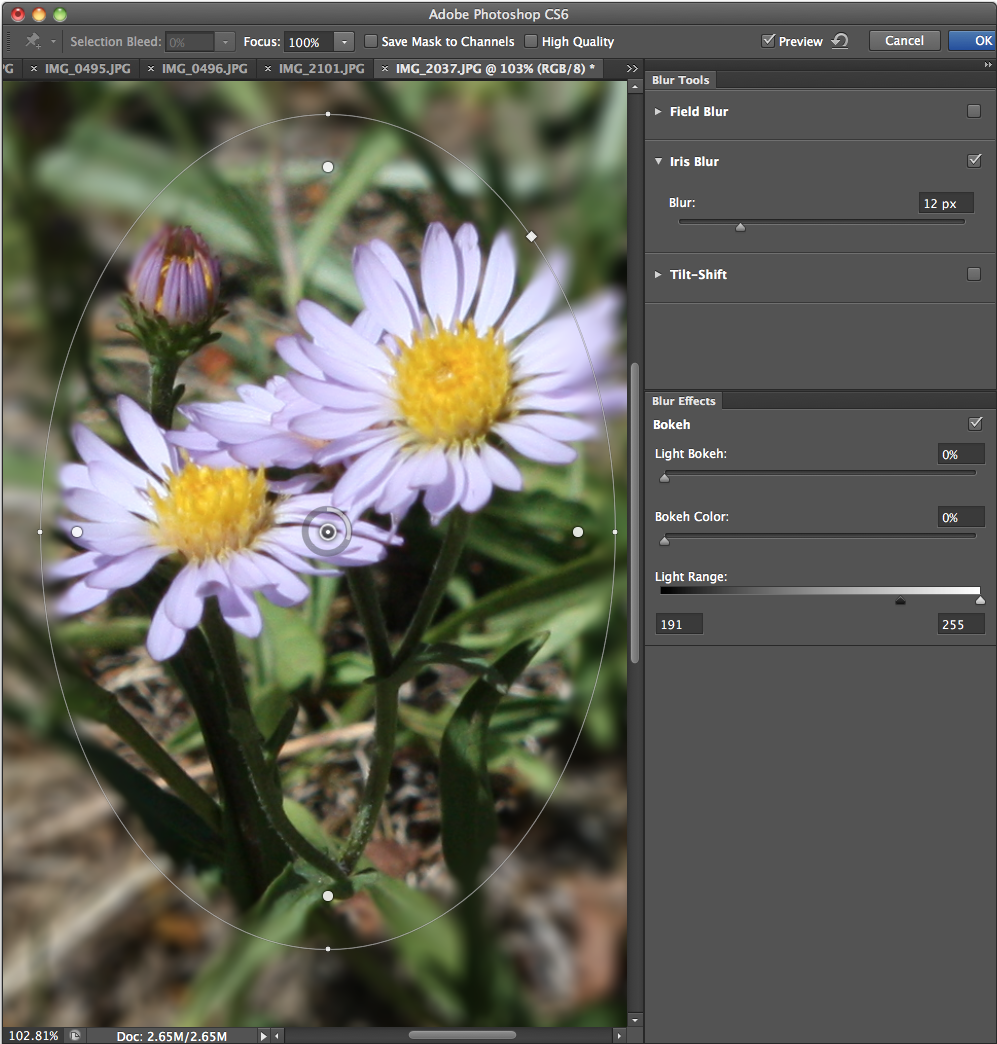
Added to Photoshop CS5’s 11 Blur plug-ins is a new Blur Gallery consisting of Field Blur, Iris Blur, and Tilt-Shift. These on-image controls add blurs to any image without requiring selections, layers, or depth maps. Iris Blur creates a shallow depth of field and lets you control the blur’s area and intensity. Field Blur lets you pinpoint (with a virtual pushpin) the parts of an image you want blurred and control blur intensity. The Tilt-Shift blur applies blurs along one or more planes, letting you adjust both location and intensity, like the popular Lensbaby tilt-shift lens. You can also apply and adjust a bokeh (background blur) effect with any of the three new Blur tools. The Blur Gallery offers a full-screen preview with collapsible panels, allowing you to see your results at a respectable size.
zoomIcon
iris20blue-276116
The new Blur gallery adds three different adjustable blurs that you can also use with the bokeh effect. This is the Iris blur, which lets you use interactive, on-canvas controls with a full preview.

Camera Raw 7
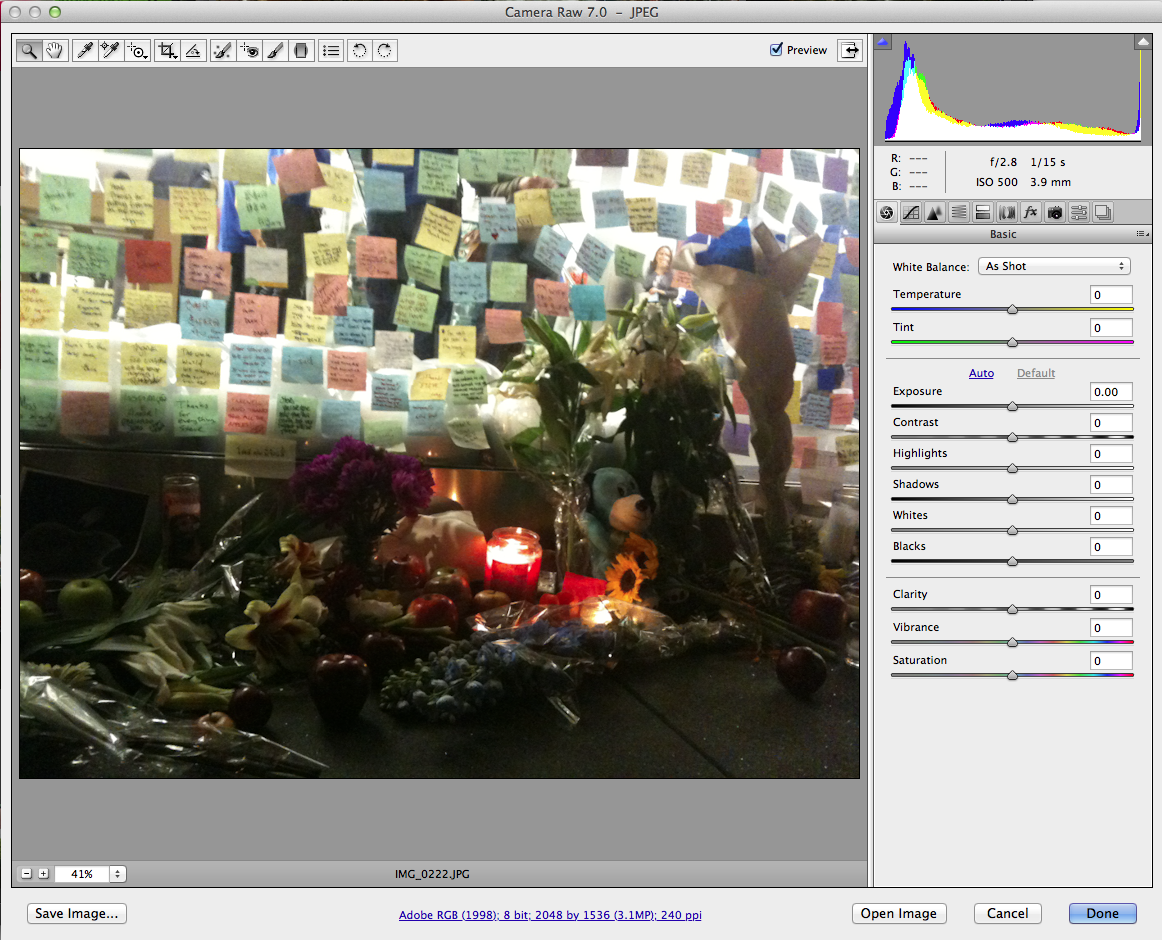
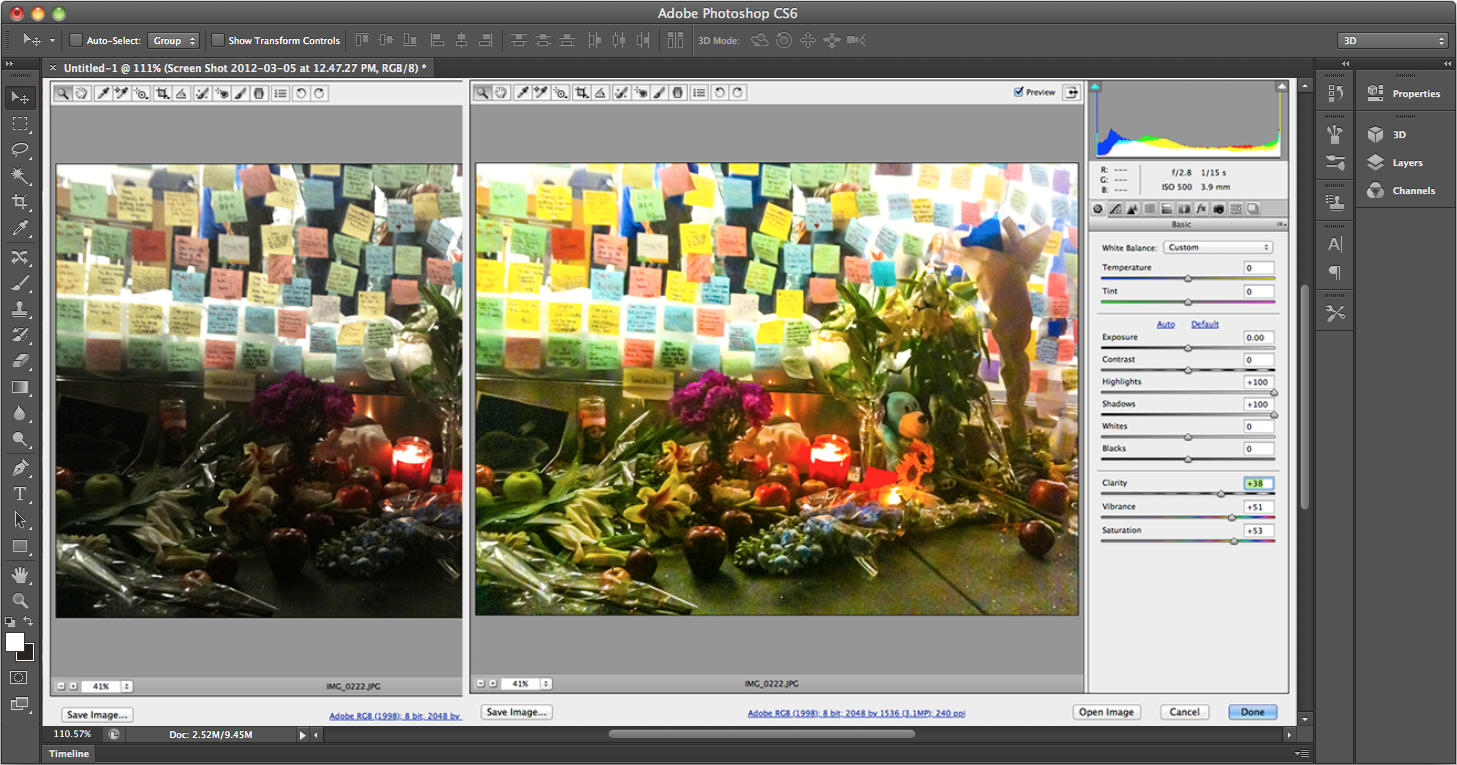
You can edit an image in the Camera Raw interface whether or not it was shot in Raw format. Adobe has rewritten the Camera Raw Basic panel and its controls for easier use. All sliders start at zero, so it’s easy to see how to fix even low-resolution shots. Two new controls, Highlights and Shadows (derived from Lightroom 4’s processing engine) help pull more detail from images than previous Raw plug-ins. Overall, the Camera Raw 7 plug-in offers more image controls that can be applied with the Adjustment Brush, including Temperature, Tint, Highlights, Shadows, Noise Reduction, and Moiré Reduction.
zoomIcon
screen20shot202012-03-0520at2012.43.0220pm-276295
Unlike past versions, all sliders start at zero so the corrections are more intuitive.

zoomIcon
29-0520create20photoshopcs620camera20raw-276097
The interface for Camera Raw 7 is easier to use than past versions and offers new Shadows and Highlights sliders.

Painting and Drawing
Photoshop would not be Photoshop without fresh tools and streamlined methods of painting and drawing. New erodible brush tips are designed to wear down naturally. You can also use erodible tips with the Brush tool, Pencil tool, Mixer Brush tool, and Eraser tool. A new Airbrush tip features a real physics engine to make airbrushing more realistic. That’s in addition to improved brush rotation, painting presets, and more. A new Oil Paint filter lets you instantly turn a photo into an oil painting.
zoomIcon
screen20shot202012-03-2120at2012.17.4720am-276311
Sometimes, a routine image just looks better as an oil painting. With the new Oil Paint filter, you won't have to wait around for the results.
Video
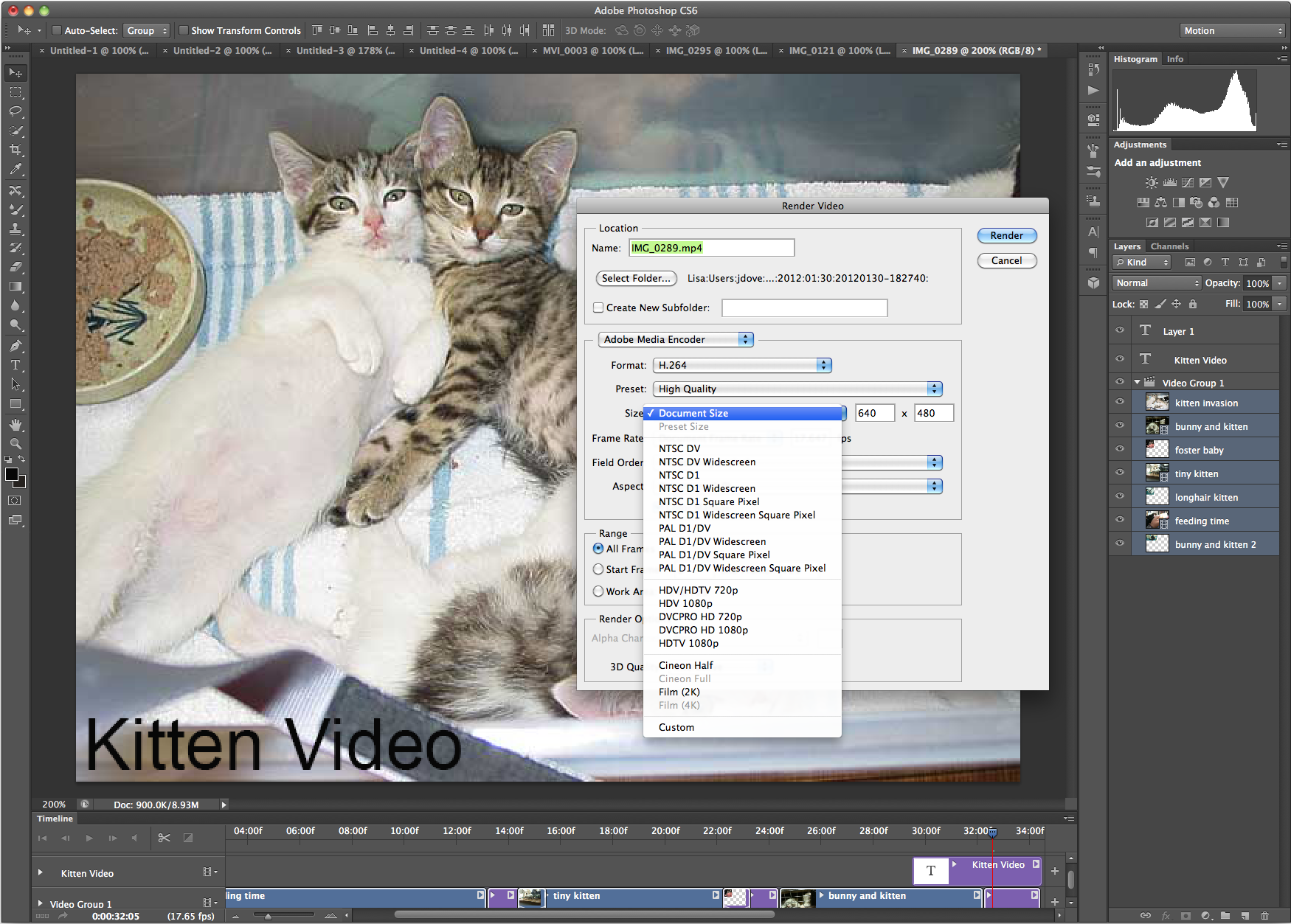
Photoshop CS6’s new video functionality—designed as a starting point for video creation—features a new Timeline panel in addition to Photoshop's familiar Animation panel. The workflow, targeted to photographers, includes letting you create, edit, splice, and add audio track and transitions to your clips in a drag-and-drop interface. Having all Photoshop's editing tools at your disposal offers manifold artistic options. You can then export and render video in a number of formats.
zoomIcon
screen20shot202012-03-2020at206.16.5720pm-276277
It's easy to select and drop video clips and stills into the timeline. Add titles and transitions via drag and drop.

zoomIcon
screen20shot202012-03-2020at206.18.0820pm-276283
Output your video to a large number of formats.

Improved Auto Correction
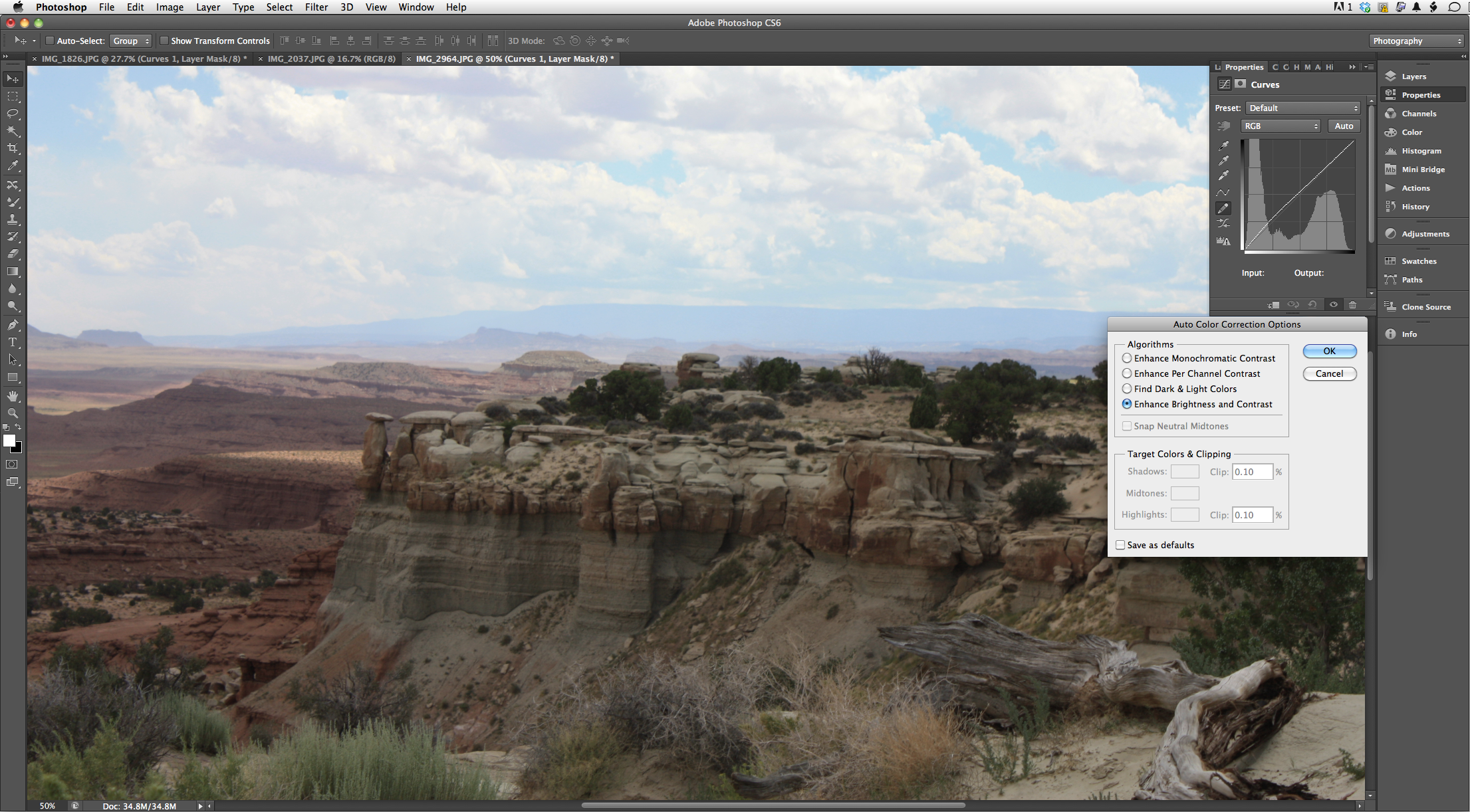
Photoshop always let you automatically correct images with various controls under the Image menu. Photoshop CS6 approaches auto corrections in a different and more intelligent way. Auto options are available in Curves, Levels, and—for the first time—Brightness/Contrast controls. The interface is the same, but the underlying algorithms driving them have changed. The Auto button derives its results from a database of thousands of hand-edited images. An Enhance Brightness and Contrast algorithm—developed with reference to thousands of manually corrected examples—bases calculations on image data.
zoomIcon
auto20controls-276122
Not all auto corrections are the same, and a new algorithm bases auto corrections on a database of hand-corrected images.

3D
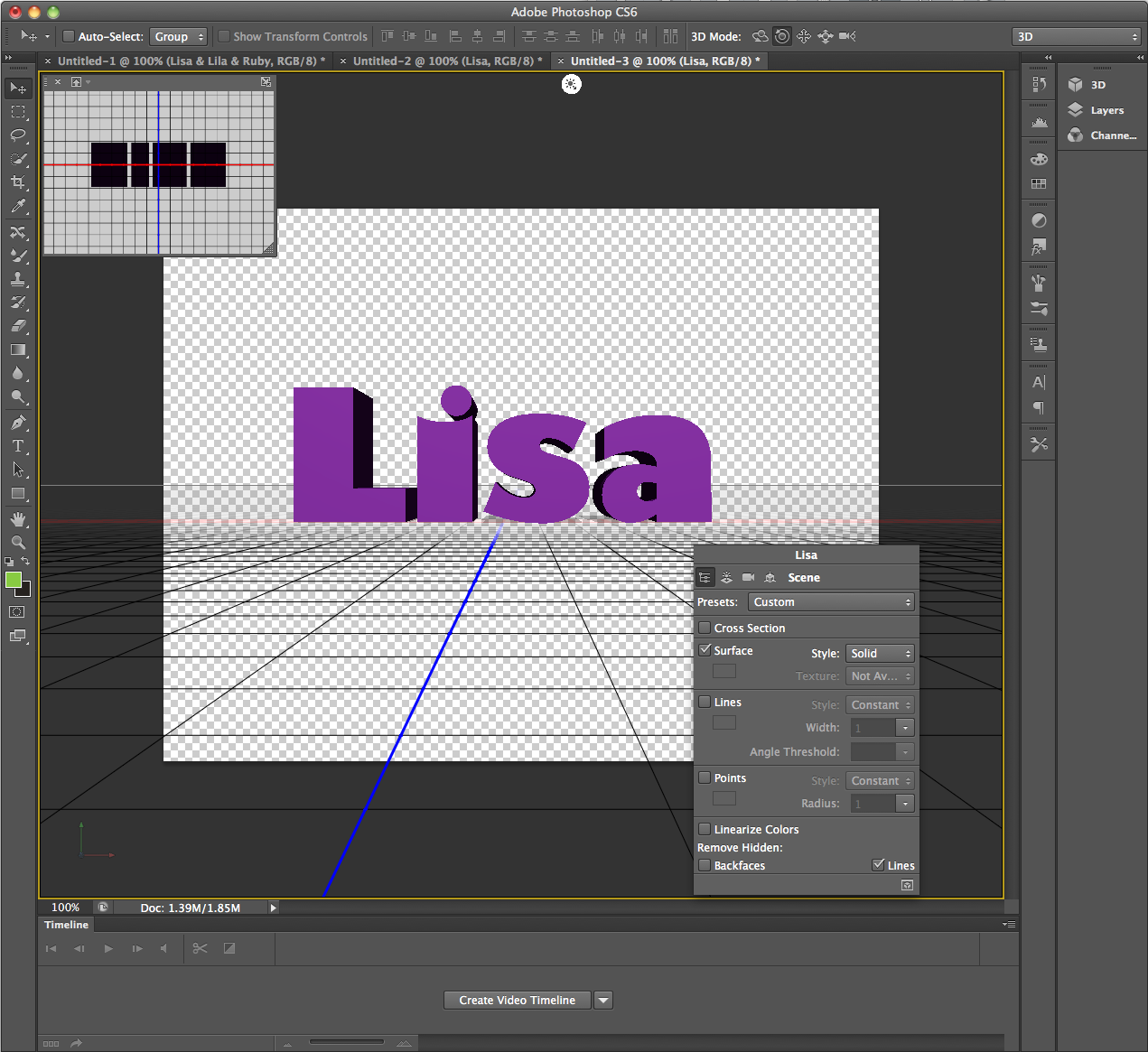
Adobe has revamped its 3D engine for CS6 to make it easier and faster to create and manipulate 3D objects. A new in-context and on-canvas editing interface is designed to enhance usability. Right-clicking on a 3D object shows contextual pop-up panels with content of the panel related to the area clicked.
Adobe has scrapped CS5’s large Reposé dialog box and subsumed the 3D technology into the interface. Now, a Properties panel and widgets enable 3D extrusion and the manipulation of 3D objects in real time. The program also supports draggable shadows and ground plane reflections. The Picture In Picture window shows an alternate view of the 3D object. With it, you can switch camera views, pan, zoom, and swap this view with the main document window.
For combining 2D and 3D functions, you can add 3D objects to a photo and have the object align with the Vanishing Point of the image.
zoomIcon
screen20shot202012-03-2020at203.18.2820pm-276271
The new 3D interface emphasizes responsiveness and ease of use with in-context and on-canvas controls.

Skin tone aware selections and masking
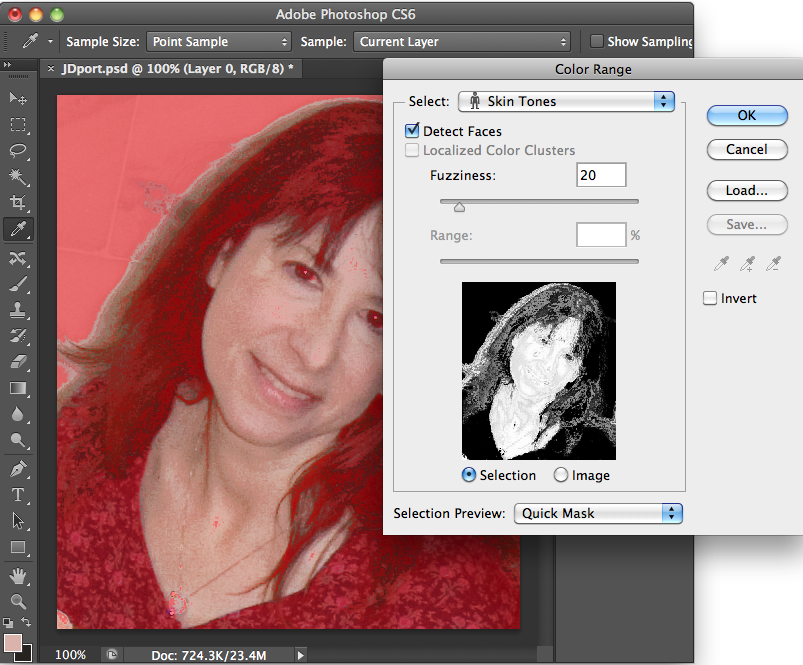
Photoshop CS6 introduces more controls for preserving skin tones in images where you either want to change or adjust the skin color, or preserve skin tones as you change other parts of the picture. The Color Range dialog box, under the Select menu, offers both a Skin Tones option and a Detect Faces checkbox. Used in concert, they can help you create an accurate mask.
zoomIcon
screen20shot202012-03-2120at205.24.2820pm-276440
Choose Color Range from the Select pull-down menu, and then choose Skin Tones and Detect Faces to preserve accurate flesh tones.
There's lots more
These are only a few highlights of the new Photoshop CS6 upgrade, now available in beta on Adobe Labs, and due out by summer. There's a lot more to look at in the beta, including Character and Paragraph styles, and a lorem ipsum generator for creating placeholder text and Rich cursors, a handy informational overlay that appears whenever you use the Move, Crop, Free Transform, and similar tools. It shows size information, rotation angle, and x/y coordinates. The new version of Photoshop welcomes Contact Sheet II and PDF Presentation back into the package, as well as a redesigned, streamlined print dialog box. New Bicubic Automatic image resampling (handy for enlargements) lets Photoshop pick the best interpolation method. It's also used with the Crop tool and Free Transform tools.

ICS for the Samsun Galaxy Note will come in Q2, with 'premium suite' apps

www.tech-sanity.com
thumb_550_att-galaxy-note-3a
Samsung mobile has issued a press release all about the Galaxy Note and it's upcoming "Premium Suite" software upgrade. Sometime in Q2 of this year, Samsung expects to update the 5.3-inch Note to their version of Ice Cream Sandwich and bring better application support for the S pen as well as unnamed extra multimedia features. 
The three applications mentioned specifically are S Note, a tool that combines notes or drawings with other digital content as well as using "Shape Match and Formula Match applications that help correct and digitize geometric shapes and even solve numeric formulas hand-drawn with S Pen"; My Story, which appears to be an application that helps you design e-cards and notes with multimedia content; and of course
Angry Birds Space -- the newest iteration of the Angry Birds franchise from Rovio. In addition, Angry Birds Space will be available (sans the extra-special Galaxy Note level) for all Galaxy Series devices. 
Of course the biggest draw for most of us will be the update to Android 4.0, which Samsung teased Note users about on Facebook earlier today. The version for the Note is said to include the features we've come to expect from ICS, including
Android Beam and Face Unlock, as well as an "entirely new look and feel" to the Android operating system. The Q2 timeframe is coming up shortly, and International Galaxy note users are ready and waiting. Hopefully, the AT&T version follows quickly. Hit the break for the full press release.

More: Samsung's Angry Birds site

Samsung offers Premium Suite software upgrade for GALAXY Note users
March 22, 2012 
Software package offers exclusive S Pen applications, enhanced multimedia features, and an Android 4.0 upgrade
SEOUL, Korea – March 22, 2012 – Samsung Electronics Co., Ltd, today announced it will be offering a Premium Suite upgrade for GALAXY Note users worldwide from Q2. It includes extra multimedia features and a range of new S Pen optimized applications in addition to an OS upgrade to Android 4.0 Ice Cream Sandwich.
The Premium Suite offers new features and applications exclusive to GALAXY Note and its innovative S Pen, which includes S Note, a unique tool that lets you combine your notes or sketches with other digital content, giving you a new way to create your own stories. S Note comes in various ready-to-use templates for a range of tasks including meeting minutes, diary and others.
S Note also includes the innovative Shape Match and Formula Match applications that help correct and digitize geometric shapes and even solve numeric formulas hand-drawn with S Pen, increasing your on-the-go efficiency and productivity. You can draw tables and grids which are instantly digitized, saving time and effort. Moreover, by using the S Note’s integrated knowledge search engines, users can quickly search, and obtain information. 

For a touch of self-expression, the Premium Suite also includes My Story, another S Pen optimized application that allows you to create personalized digital cards for friends or family using any type of content including notes, video content, photos, text or voice.

In celebration of the Premium Suite upgrade announcement, Samsung will provide special offers to all GALAXY users as an official launch partner of Angry Birds Space, the newest Angry Birds game from Rovio Entertainment. For all Samsung GALAXY users, an exclusive GALAXY Note level will be provided for extra fun. Moreover, a special package of 30 challenging levels – ‘Danger Zone’ – will be available for free if unpacked within the three-month period. Visit 
http://samsung.angrybirds.com/galaxynote  for more information.

“GALAXY Note continues to delight customers all over the world with its incredible versatility and unique user experience. With the Premium Suite upgrade, we wanted to add features that enrich users’ Note experience even more, including the great advantages of Android 4.0 and innovative applications for S Pen,” said JK Shin, President of IT & Mobile Communications Division at Samsung Electronics. “We are committed to providing extraordinary experiences for consumers, and we will continue to provide new features and upgrades to enrich our offering.”

The Ice Cream Sandwich upgrade brings an entirely new look and feel to Android on GALAXY Note, with a more intuitive user interface that includes a redesigned App menu for easier multi-tasking. The upgrade also introduces innovations such as Face Unlock, Snapshot, Android Beam and others.

The availability and scheduling of the software upgrade will vary by market and wireless carriers’ requirements. 

New iPad (3) Camera connection kits does alot more

www.tech-sanity.com
IMG_2879_270x180.JPG
Using the Camera Connection Kit (CCK) to transfer and edit photos, videos
The CCK offers two ways to transfer photos from your camera to your iPad. If your camera uses an SD card, use the SD card adapter. But, if your camera uses another storage card (like Sony's proprietary card), connect it to the USB adapter with the included USB cable.
Once your respective adapter is in the iPad, the Photos app will launch immediately. Tap to select the photos you want to transfer, or tap Import at the bottom and select Import All. The imported photos will appear in the Albums tab in a new folder.
You'll then have the option to delete the photos from the SD card, which is useful if you're traveling and need to clear up some storage space on your SD card in a pinch.
Now that your photos are on the iPad, you can
edit them in the iPhoto app, share them on Facebook, or even upload them to your Dropbox or other cloud storage service.
For the record, I've tested the Camera Connection Kit with the iPhone, and it is definitely not compatible. Bummer.

The USB adapter of the Camera Connection Kit can be used with more than just your camera.
(Credit: Sharon Vaknin/CNET)
Using the CCK for more than just photography
Unlike its name implies, the CCK will also allow you to use other USB-compatible devices with your iPad. But because these devices draw power from the iPad, only some will work.
Here are some that may work (possibly with some limitations) with your iPad:
  • MIDI gear: Digital keyboards, drum sets, and synthesizers can be recorded using an app like GarageBand. Not all models will work, so check this list to see if yours is compatible. If the instrument can be connected to external power, be sure to plug it in.
  • USB microphones: Record higher-quality audio with an external mic, like the Snowball, which is compatible with the iPad via the CCK. With this setup, you can record voice directly into GarageBand or your preferred audio recording app.
  • Desktop keyboards: Your USB desktop keyboard is much more comfortable than those cramped iPad keyboards. Sure, it's not a portable solution, but if you find it necessary, you can plug in a regular keyboard to the CCK. Just ignore the warning message.
  • Card readers: If your camera writes to a CF card, and you have a small CF card reader, simply plug it into the USB adapter and the iPad will read its contents.
  • Ripped movies: If you have any ripped movies or personal videos, you can use the CCK to add extra storage to the iPad. You'd only import a movie when you're ready to watch it. To do this, rename your movies to match the file name structure of your digital camera. For example, "DCIM_4132." Then, drag the file into a folder labeled "DCIM" on an SD card or a thumbdrive. When you plug your SD card or thumbdrive into the iPad via the CCK, you'll be able to import the movie onto your iPad and play it from the Photos app.
  • Your iPhone or Android phone: This works, but with some limitations. If you need to transfer photos from your iPhone to your iPad in a pinch, plugging it in via USB will prompt the photos app, allowing you to import photos. And, as long as your Android phone stores photos in a folder titled DCIM, it will react the same way.

After some testing, it's clear you
cannot read or write nonphoto files to an external hard drive or thumbdrive. This would have been a great way to expand your iPad's storage. Alas, it's not (yet) possible.

If you discover any unique ways to use the Camera Connection Kit, let me know in the comments.

Wednesday, March 21, 2012

New iPad Uses Retina Graphics When Running iPhone Apps

www.tech-sanity.com
When the iPad was first introduced there weren't many iPad-specific apps yet available. As a solution, Apple allowed apps designed for the iPhone's smaller screen to run on the iPad in a form of emulation. The apps could be run as if they were on the iPhone, using only a fraction of the iPad's screen. Alternatively, those apps could also be run in a 2x mode, using a technique called pixel doubling to fill the iPad's screen. However, when in 2x mode, both artwork and text would look blocky and pixelated.

Since the original iPad's launch, both the iPhone and iPod Touch has been upgraded to high resolution Retina displays. While Apple could use the Retina graphics from apps that had been upgraded to work with the iPhone 4 and 4S's 960x640 display (nearly all iPhone apps nowadays), so far, they've chosen not to. Instead, the iPad 1 and 2 continue to just pixel double the 480x320 display from the original iPhone's screen. In fact, there is even a jailbreak app called
Retinapad that enables the use of iPhone Retina graphics on the original iPad, filling this gap in functionality.

The new iPad, however, now displays the Retina graphics of apps designed for the iPhone in both 1x and 2x mode, resulting in a significantly improved visual experience, as pointed out by a user
on the TouchArcade forums. The user experience issue still exists -- in 2x mode, interface elements are twice as large -- but it looks much better .
I just tested this with NBA Jam, which the iphone version looked like crap on my ipad 1, but looked great through retinapad when I had it jailbroken since it was tricked into loading the iphone 4's retina enable graphic assets. Now, on my brand spankin' new ipad third gen, it looks fantastic, without retinapad, just by enabling the 2X option at the bottom right of the screen.
thumb


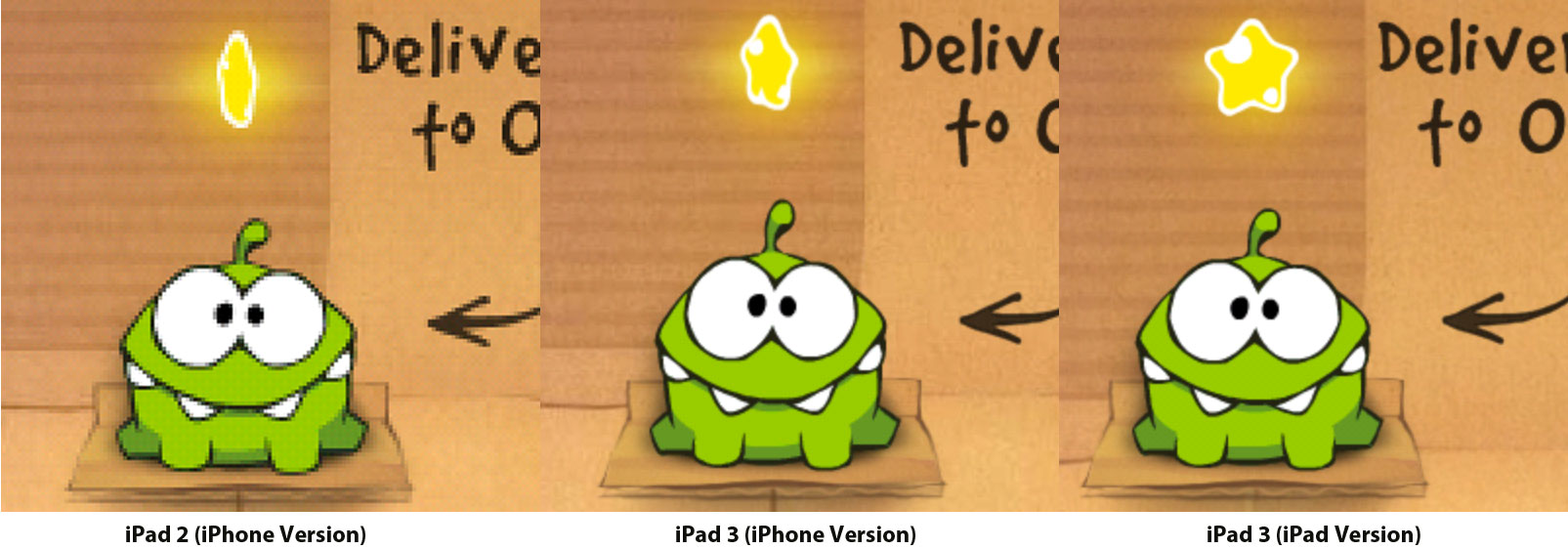
Click to compare in full size to Native iPad version.


In this image above, the graphics of the iPhone version of
Cut the Rope have been compared side-by-side on an iPad 2 (left) and iPad 3 (right). Note that while there is an iPad-native version of the app available, we used the iPhone version to illustrate the differences. The iPad 3 version uses the iPhone Retina graphics found in Cut the Rope for iPhone, resulting in a much sharper image.

In fact, the iPhone version now looks nearly identical to the
iPad native version of the game:

ipadversion


Note that
Cut the Rope HD has not yet been updated to support the iPad Retina display, so of course, native Retina iPad apps will look even better on the new iPad. In the meanwhile, iPhone apps running on the new iPad will also see a notable visual improvement, approaching previous iPad native apps.

iPad’s display is close to studio reference quality Test Confirm

www.tech-sanity.com
new-ipad-color-diffs


The screen tech experts at DisplayMate have run their tests and confirmed that the new iPad screen basically blows everything else away.
“Apple has taken the very good display on the iPad 2 and dramatically improved two of its major weak points: sharpness and color saturation — they are now state-of-the-art,”
 writes DisplayMate President Dr. Raymond Soneira. “Our lab tests and visual tests agree with Apple’s claim that the new iPad has ‘the best display ever on a mobile device.’”
While most of the tech press has focused on the new iPad’s increased screen resolution, Soneira says the improved color saturation is “equally responsible for its wow factor.” Compared to the iPhone 4S and iPad 2, which display 60 to 64 percent of the standard color gamut, the new iPad hits a “virtually perfect” 99 percent of the color gamut. And because of proper calibration, the new iPad offers vibrant colors that aren’t overly saturated like some OLED displays.
Soneira notes that with some minor calibration, the new iPad’s screen could qualify as a studio reference monitor — a screen so good that you could use it for accurate representations of color. It’s the sort of feature that appeals to photographers and movie directors, who want to make sure that their images look as good as possible.

Tuesday, March 20, 2012

New iPad LCD given top marks, was near-flawless, with 99 percent color accuracy

www.tech-sanity.com


ipad2012
Continuing some of the more
in-depth examinations of the new iPad, a detailed screen comparison at DisplayMate has shown a major improvement in Apple's tablet display quality, albeit at a cost. While the 2048x1536 resolution is an obvious advantage, the display analysis team saw that the new screen saw big improvements in other areas, most of all color accuracy. While the iPad 2's display got just 61 percent of the standard color range, the new iPad's screen was near-flawless, with 99 percent accuracy on top of "perfect" contrast and gamma levels.
The 9.7-inch display was better than its predecessor in cutting back on screen reflection, and didn't lose any significant ground in brightness, black levels or a resistance to color shifting when off-angle.

Going to the much higher resolution display has delivered a major hit to power efficiency, researchers saw. It uses 2.5 times power backlighting power to keep up performance, jumping from a maximum of 2.7W on the iPad 2 to 7W on the newer tablet. It helped narrow down the power consumption issues to the backlight and not the quad-core graphics by themselves. Supporting this, battery life was comparable at a halfway setting, but shrank considerably when both were put at their maximum power.
While a direct hardware comparison wasn't available, DisplayMate was confident enough to say that the new iPad's screen "decisively beats" any other tablet previously mentioned, including the Barnes & Noble Nook Tablet and Samsung Galaxy Tab 10.1. It was likewise "much better" than most TVs and computer-sized displays, and was to the point where the study considered the iPad virtually good enough to be used for pro color proofing. "With some minor calibration tweaks the new iPad would qualify as a studio reference monitor," the group said.

Other companies like Acer and ASUS are expected to respond with higher resolution displays and will often use IPS, but they may not have the same color accuracy.

Samsung fined for obstructing Korean government investigation into price fixing

www.tech-sanity.com
DSC_8675-hero_large_verge_medium_landscape

Samsung is among the companies being fined for price fixing in the handset space, and now the Korean Fair Trade Commission has issued an additional fine of 400 million won ($356,000) after Samsung was found to have obstructed the FTC's investigation. This latest penalty is in addition to the 14.2 billion won fine ($12.6 million) the company already received for its part in the price fixing scandal. According to a report from the Korea Joonang Daily, when FTC officials arrived to investigate Samsung's offices in Suwon, they found their way impeded by a team of security guards. Meanwhile, employees were ordered to delete data and replace computers that contained important information, while an executive falsely stated that he was away on a business trip to avoid an interview. By the time FTC officials made their way into the building, nearly an hour later, there was just one employee in the office. It was also revealed that some of the data that Samsung actually turned in had been manipulated.
The FTC's latest fine is its largest yet in an obstruction case. All told, the commission has issued around $40 million in fines to Korean telecommunications companies and handsets manufacturers, who are accused of colluding to artificially raise the prices on phones, and then using subsidies to make the devices look like a good deal.

3 Million iPads sold in 4 days

www.tech-sanity.com
Apple has sold three million new iPads since its release last Friday. It's a staggering number in 4 days. It's truly impressive. It's only one million below iPhone 4S-level numbers. Except the iPad costs a lot more money and, theoretically, it doesn't have as much use as a phone.
Two more data points for comparison: it took the original iPad 80 days to reach the three million unit mark. Eighty days. Then it took the iPad 2 28 days to reach one million units, although the iPad 2 was only initially available in the United States. The iPad 3 has been launched simultaneously in a lot of big markets: US, United Kingdom, Australia, Canada, France, Germany, Hong Kong, Singapore and Japan, as well as Puerto Rico, Switzerland, and the US Virgin Islands.
The multiple market availability accounts for a lot of those three million, but it's still a very impressive number.
The iPad and App Store tandem is so solid at this point that they may be able to keep the hegemony of the tablet market for years, just like the iPod did, redefining the music player in tandem with the iTunes store. Google and Microsoft are going to have an extremely hard time attacking this formidable armored machine.

Galaxy S III to have quad-core Exynos SoC with built-in LTE?

www.tech-sanity.com
Exynos-logo_large_verge_medium_landscape
A report from the Korea Times today cites an anonymous Samsung executive as saying that the company is preparing a quad-core system-on-chip to power the successor to the Galaxy S II, which, importantly, will have Samsung's own LTE modem built in. We've written at length about Nvidia's problem of not having an LTE-compatible Tegra 3 configuration to offer to US carriers — a hurdle that's mostly been erected by Qualcomm's refusal to help a direct competitor integrate its LTE modems into the chip — and this news seems to show Samsung had the foresight to develop its own alternative in time for the GS III launch. Citing a second Samsung executive, the report goes on to note that the company has already used its LTE solution in the Galaxy Nexus in the United States and feels confident about its compatibility and reliability.
As usual with Samsung and the Galaxy S III, however, this remains unconfirmed information. When the
Korea Times reached out to Qualcomm and Samsung for official comment, its requests were met with a wall of silence. The latest intel we'd previously heard on the matter was that Samsung was considering using Qualcomm's MSM8960 — a system-on-chip that combines LTE and application processor into one, dropping Samsung's hardware — or some combination of Samsung- and Qualcomm-built parts. The addition of a Samsung LTE modem to the upcoming 32nm Exynos processor could take care of that problematic choice very easily and free up Samsung from having to rely on Qualcomm's consent for future products.

Linux kernel 3.3 released with merged Android code

www.tech-sanity.com


android-linux
The latest refresh of the Linux kernel, 3.3, is now available, and the second release of 2012 brings with it the long-awaited merging of code from Google's little side project. While that is particularly interesting to developers looking to boot Android or run apps on the stock Linux kernel (FYI: optimized power management and other infrastructure that didn't make it this time will arrive in the next release, 3.4) and represents a resolution to the issues that kept the two apart for so long it's not the only new feature included. There are improvements to file systems like Btrfs, memory management, networking, security and much, much more. Hit the source link below for the full changelog or grab the code and from the usual locations and get your compile on directly.

Monday, March 19, 2012

Update on iOS 5.1 Jailbreak For New iPad, iPad 2, iPhone 4S

www.tech-sanity.com

On the day of the new iPad launch, the jailbreak community was on fire, first Stefan Esser and then iPhone Dev Team and chpwn + phoneixdev revealed that they had figured out a way to jailbreak the new iPad within hours of it going on sale.
Stefan Esser aka
i0n1c was the only one to clarify that his 3rd generation iPad jailbreak was untethered.
He has just
confirmed that his method is the only untethered jailbreak for iOS 5.1, which means iPhone Dev team and chpwn + phoneixdev's methods are  tethered jailbreaks.
Why am I not surprised that iPhone blogs claim there are 3-4 untethered jailbreaks for iPad 3 around.
I guess the source of this misinformation is Redmod Pie - there is only one untethered jailbreak of iOS 5.1 so far.
There are actually more than 3 kernel exploits. iPhone Dev Team and @chpwn / @phoenixdev are sitting on their own kernel exploits for 5.1.
Untethering a JB however requires more trickery and additional userland bugs.
If someone is able to untether the latest device it is highly likely that he can untether all previous devices.
Here's the video again (courtesy i0n1c) that shows an untethered jailbroken iPad 3rd generation:


i0n1c hasn't still provided any ETA on when he plans to release an untethered jailbreak for iOS 5.1, which based on his tweets should support all iOS 5.1 compatible devices (which means the new iPad, iPad 2, iPad 1, iPhone 4S, iPhone 4, iPod touch 4G, iPod touch 3G).
Esser was credited for the 
untethered jailbreak for iOS 4.3.x and had given a presentation on iOS jailbreak techniques at Black Hat 2011 in Las Vegas last year.

Sunday, March 18, 2012

The New Apple TV Teardown Reveals Same 8 GB Flash Storage, New Chip and 512 MB RAM

www.tech-sanity.com
Following the release of the third-generation Apple TV late last week, one forum member at XBMC.org has
performed a teardown of the device, revealing a number of details about its internals.

As Apple notes on the
tech specs page for the new Apple TV, the device utilizes a unique single-core A5 system-on-a-chip, an upgrade from the A4 package found in the previous generation but lacking the dual-core processor found in the A5 chip used in the iPad 2 and iPhone 4S. The Apple TV teardown reveals a typical-looking A5 chip at first glance, carrying date codes suggesting it was manufactured during the seventh week of 2012, or mid-February.

apple_tv_3_board

The processor inside the new Apple TV's A5 package is identified as APL2498, indicating a variation on the APL0498 processor found in the standard dual-core A5. The part number for the RAM included in the chip suggests that it is a 512 MB chip from Hynix, a boost from the 256 MB of RAM found in the A4 package on the previous-generation Apple TV.

As for flash storage, the format of the part number stamped on the chip implies that it is an 8 GB part from Toshiba, meaning that the device carries the same storage capacity as found in the previous-generation model. Given that the Apple TV is a streaming-only device, on-board storage is only required to support the operating system and buffering of streaming content.

There had been some speculation that Apple could boost the on-board storage in order to handle larger 1080p content supported on the updated model, but it appears that Apple still views 8 GB as sufficient given
limited increases in file size for 1080p content. Maintaining 8 GB of on-board storage undoubtedly also helps Apple maintain the $99 pricing on the Apple TV given other improvements such as the A5 chip.

Finally, the new Apple TV appears to contain a second antenna that was not present in the previous-generation model, although it is unclear exactly how the new antenna is being used to improve performance.

Saturday, March 17, 2012

Mountain Lion 2nd release reveals Twitter notices, contacts protection

www.tech-sanity.com
The second developers release of OSX Mountain Lion has been released to developers and a few new things have shown up. More to come no doubt.

MLDP2-discoveries-inline1

MLDP2-discoveries-inline2

MLDP2-discoveries-inline3
New iCloud service may sync open tabs as well
Among the small but significant changes are automatic Twitter notification options, a new iCloud button in Safari that will let users sync tabs across devices, and more explicit permission in OS X when an app wants to access personal information stores such as the Address Book.
The latter change reflects a move already made in iOS 5.1 to better protect users' contacts after it was discovered that a number of apps were
circumventing Apple guidelines and uploading personal information without explicit user permission. Mountain Lion will also feature a new "Privacy" panel in System Preferences where users can manage what apps can access in terms of personal data, MacRumors reports.

Mark Gurman notes that users of Mountain Lion DP2 can also opt to have Twitter for Mac notifications turned on, which lets replies and direct messages be shown on the desktop in the Growl-like Notification Center that is set to be another new feature in Mountain Lion. Also noted is a new optional "iCloud" button that offers to sync open tabs between devices, letting a user start web surfing on one device and continue on another. The syncing may also preserve the previous state of the tabs (a feature found in Lion already) so that all tabs can be re-opened on a new launch.

Mountain Lion is expected to be released this summer.

Significant changes to the new iPad's chip compared to other models

www.tech-sanity.com
(Credit: Apple)
apple-a5x-ifixit-center-2-small
Apple has changed the design of the main chip in the new iPad with tweaks to accommodate a higher-performing chip, according to teardown analysis. That would be necessary, of course, to drive that pixel-dense screen.
There are two significant changes:
  • Separate DRAM: Apple's A5X chip package does not "stack" system memory (aka, SDRAM), like the A5 did in the iPad 2, as seen in an analysis by Chipworks. Instead, the DRAM resides in "discrete" devices, according to Anandtech. And note that the new iPad has 1GB of memory. The iPad 2 had half that much.
  • Heat spreader: The new A5X chip is capped by a metal heatspreader, as pointed out by Anandtech, which speculates that a new package would "allow for better removal of heat." That implies higher performance. A faster chip typically runs hotter.

VR-Zone ventures the guess that "we're looking at a larger chip and it's obviously running a fair bit hotter than the [previous] A5."
To be sure, Apple squeezes a whole lot of horsepower into a 9.4mm thick
tablet: the A5X has a dual-core CPU (central processing unit) and a quad-core GPU (graphics processing unit). All completely necessary to drive the 2,048x1,536 Retina display.

iPad's A5X chip and main circuit board.
(Credit: iFixit)

And there really isn't any tablet out there right now that competes with the new iPad on the display and graphics chip fronts, Anandtech's Anand Shimpi told CNET.
"In terms of GPU performance...the 543MP4 should be the fastest thing out there," Shimpi said, referring to the PowerVR SGX 543MP4 GPU that Apple uses.
Of course, consumers will only notice that gorgeous display but it's nice to know that Apple has also designed some pretty stellar silicon to move around the millions of pixels packed into the Retina display.

Huawei Ascend D the new King of Android?

www.tech-sanity.com
DSC_7807-hero_large_verge_medium_landscape
When Huawei announced the Ascend D quad U510 at MWC 2012, it proudly proclaimed that its in-house quad-core SoC made it the world's fastest smartphone. While at the time it seemed an audacious remark for the company to make, benchmarks scores are starting to surface that appear to validate its claims. AnTuTu Benchmark is a popular Android app that benchmarks a range of system functions, and Huawei's latest smartphone is sitting at the very top of its leaderboard. It outscores other companies' upcoming flagship devices, including the LG Optimus 4X HD and HTC One X, and is only topped by a pair of Asus Transformer Prime tablets that have had their CPUs heavily overclocked.
The D quad has also
bested all competitors in NenaMark v2, overcoming new devices like HTC's One S as well as established powerhouses like the Galaxy Nexus and Galaxy S II. NemaMark is a benchmarking app that specifically tests the graphical capabilities of a device. It runs the tests at the device's native resolution, so for a 720p device like the D quad to outperform lower resolution devices such as the Galaxy S II and HTC One S is quite a feat.
However, benchmarks often don't relate to real-world performance, so you should take these scores with a pinch of salt, as well as noting that HTC and LG's flagships may not have been running finished software, which could affect future scores. Benchmarking apps like Quadrant have also in the past been fooled by developers into producing inflated scores, although we've never heard of either NenaMark or AnTuTu being tricked before. We'll have to wait for the phone's release to find out if all of this apparent raw power is put to good use, and more importantly, if Huawei has made a compelling product to match.

New iPad iOS 5.1 Jailbreak Status Update: Dev Team Has Some Good News

www.tech-sanity.com
redsnow-iphone3g-43.jpg

Hot on the heels of news that iPad 2 running iOS 5.1 has been successfully jailbroken by i0n1c, iPhone Dev team has come out with more encouraging news regarding the new iPad and iOS 5.1 jailbreak.They've provided the following details on their blog:
There are a few bits of good news already.

  • We can confirm that the method used to jailbreak the iPad2 4 months ago (before corona) still works even in 5.1.  That means we’ll at least be able to get our foot in the door to get the required kernel dumps on the iPad3.  That’s an important step, but by no means is it the end of the story.

  • Those of you following @i0n1c may have noticed he’s already tweeted pictures of his iPad2 jailbroken at 5.1.  As far as we know, he’s using a method completely unrelated to the one mentioned above.  That would be great news!

  • We’ve also seen bits and pieces of an entirely different jailbreak method being investigated by someone close to the Cydia repo scene.

That’s three different angles, and we’re not even including the continuous work @pod2g makes towards a new jailbreak!  As always, keep in mind this is very preliminary progress, and it’s impossible to predict how or when these things turn out. 
While it is still early to say how long it will take for the jailbreak to be released, it is good to see that the jailbreak community has three angles to work out.

Thursday, March 15, 2012

New Apple TV Very Close to Blu-ray quality.

www.tech-sanity.com


a3

I never bought a Blu-ray player and now the new App;e TV is out I very much doubt I ever will the new 1080p Apple TV is here and it's that good
To be clear, because of the way it’s compressed, iTunes 1080p content is not equal to the 1080p picture you’ll get from a Blu-ray disc.
It’s very close. I imagine it will get there as digital compression technology continues to improve. But even if it doesn’t, this is something that won’t mean a thing to the vast majority of consumers. Thanks to the marketing of television sets over the years, they know “1080p”. They don’t know that the quality can be inconstant. Fair or not, it won’t matter.
That’s one reason why the new Apple TV is such a huge win here. Previously, it was limited to displaying 720p content which undoubtedly gave some would-be purchasers pause. But a new chip (a single-core A5), some 1080p content in iTunes, and the same $99 price changes that.
But there are cheap Blu-ray players out there now, so why does the Apple TV trump those? And what about other boxes like the Roku, which can also do 1080p streaming content? One word: AirPlay.
b2
Having used the previous iteration of the Apple TV almost a year now, I’m absolutely infatuated with AirPlay. The love affair is so deep that I’m sickened to think about going on the road and it not being available in most hotel rooms. It absolutely should be. And if we can just get past some open WiFi issues (imagine someone pushing content to another, unsuspecting room), and some greedy hotel chains (who love their rip-off pay-per-view content), it will be. The boxes should be as ubiquitous in hotel rooms as iPod/iPhone chargers now are.
AirPlay is one of those things that still seems like magic every time you use it. How on Earth am I streaming an HD movie wirelessly from my iPhone or iPad to my television while I continue to use that device? If it’s possible, why does anything need wires anymore?
I think people are often tricked when they first hear about the Apple TV. Certainly, Apple does everything in their power to downplay its importance to the company. And yes, that probably has something to do with other, more substantial television hardware coming down the line. Right now, people look at the Apple TV and think, “okay, cool, a tiny device to access iTunes content from my television”. At $200 to $300, it made little sense. At $99, it made some sense. But it still lacked that killer feature.
c2
The true key to the Apple TV is AirPlay. And the latest version supports 1080p streaming as well. And soon, with the release of OS X Mountain Lion, you’ll be able to AirPlay your entire desktop to your television. Meanwhile, the potential for gaming here is just starting to be tapped.
There’s no reason why every person with an iOS device (and soon a Mac) shouldn’t get an Apple TV. And that’s a problem for the makers of Blu-ray players. Again, just slightly better quality will no longer be enough. Apple’s latest Apple TV is going to continue the trend they began with the MacBook Air —
the killing off of optical discs.
As for the rest of the new Apple TV, it’s great, just like the last version was. The outside looks the exact same and it’s just as easy to set up. The included aluminum remote control is still pretty lame (try searching, or doing anything that involves typing with it), but you can get around this if you have an iOS device — get the Remote app ASAP.
Alongside the new Apple TV announcement, Apple rolled out new software for the device. It’s a significant improvement over the previous software. You’ll note right away how app-y everything looks. When you consider this along with the fact that the Apple TV technically runs a version of iOS, it’s clearly only a matter of time before more apps come to the device. Currently, Apple has a very limited set of third-party partners (Netflix, MLB.TV, etc) on the device. But they could easily open it up. (Though, again, they may not ever have to thanks to AirPlay.)
d1
The good news is that the Apple TV software update also works on the last iteration of the Apple TV. So unless you really want access to 1080p content, there’s not a huge incentive to buy a new one. (Even with the new software, the older Apple TV is limited to 720p.)
And because Apple has moved all of their TV catalog and much of their movie catalog to iCloud (some studio deals are still being negotiated, but sound close to being done), all applicable HD content can be automatically upgraded to 1080p from 720p (SD content will remain SD).
So no, Apple didn’t give a huge incentive for current Apple TV owners to upgrade to the newer box. But they gave a huge incentive to millions of people without an Apple TV to get one. And that’s bad news for Blu-ray.
11
2
g
f1